Lab Guide: Exploring Agentic AI using LlamaStack
This lab will guide you through setting up this environment and exploring the core concepts of building advanced, multi-component agentic systems. First we are going to setup all relevant components of Llama Stack. Afterwards we are going to create multiple agents, that demonstrate different llama stack capabilities.
1. Environment Setup
|
This lab explores the Llama Stack on Red Hat OpenShift AI (RHOAI) included in RHOAI v2.25.
For this its necessary that you apply the 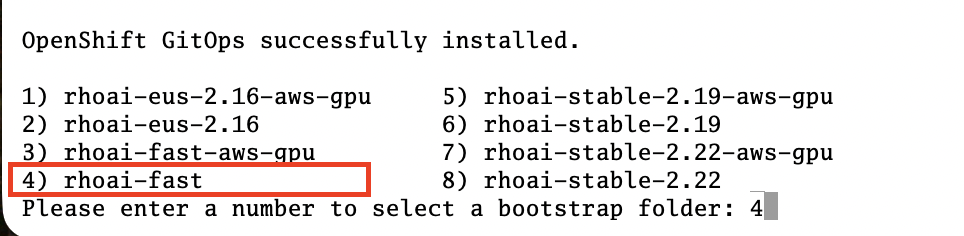
|
2. Introduction
Before we start with the setup of everything we are going to have a look at the most important tools & technologies, we are going to explore during this lab:
2.1. Llama Stack
Llama Stack is a comprehensive, open-source framework started at Meta, designed to streamline the creation, deployment, and scaling of generative AI applications. It provides a standardized set of tools and APIs that encompass the entire AI development lifecycle, including inference, fine-tuning, evaluation, safety protocols, and the development of agentic systems capable of complex task execution. By offering a unified interface, Llama Stack aims to simplify the often complex process of integrating advanced AI capabilities into various applications and infrastructures. The core purpose of Llama Stack is to empower developers by reducing friction and complexity, allowing them to focus on building innovative and transformative AI solutions. It codifies best practices within the generative AI ecosystem, offering pre-built tools and support for features like tool calling and retrieval augmented generation (RAG). This standardization facilitates a more consistent development experience, whether deploying locally, on-premises, or in the cloud, and fosters greater interoperability within the rapidly evolving generative AI community. Ultimately, Llama Stack seeks to accelerate the adoption and advancement of generative AI by providing a robust and accessible platform for developers of all sizes.
References:
2.2. Agentic AI
Traditional AI applications are reactive - they respond to prompts with text. Agentic AI is proactive - it can:
-
Reason through multi-step problems
-
Plan sequences of actions to achieve goals
-
Act on live systems through secure tool integrations
-
Learn from interactions and improve over time
Think of it as the difference between a helpful chatbot and an intelligent assistant that can actually get work done.
References:
2.3. Retrieval-Augmented Generation (RAG)
RAG provides a means to supplement the data that exists within an LLM with external knowledge sources of your choosing—such as data repositories, collections of text, and pre-existing documentation. These resources are segmented, indexed in a vector database, and used as reference material to deliver more accurate answers. RAG is useful because it directs the LLM to retrieve specific, real-time information from your chosen source (or sources) of truth. RAG can save money by providing a custom experience without the expense of model training and fine-tuning. It can also save resources by sending only the most relevant information (rather than lengthy documents) when querying an LLM.
References:
2.4. MCP Server
The open-source Model Context Protocol defines a standard way to connect LLMs to nearly any type of external resources like files, APIs, and databases. It’s built on a client-server system, so applications can easily feed LLMs the context they need. The OpenShift Model Context Protocol (MCP) Server, which we are going to use in this exercise, lets LLMs interact directly with Kubernetes and OpenShift clusters without needing additional software like kubectl or Helm. It enables operations such as managing pods, viewing logs, installing Helm charts, listing namespaces, etc.—all through a unified interface. This server is lightweight and doesn’t require any external dependencies, making it easy to integrate into existing systems. In the advanced level notebooks, we use this server to connect to the OpenShift cluster, check the status of pods running on the cluster, and report their health and activity.
References:
3. Prerequisites
-
You have access to a Red Hat OpenShift AI v2.25 environment.
-
You have access to Model as a Service (MaaS) to get an API token for LLM models.
-
You have access to Tavily to get an API token for the websearch tool.
4. Verify RHOAI installation
|
First check within Openshift Gitops, that the "openshift-ai-operator" application is synched and healthy. If any of the ai-example-* argocd applications are unhealthy or unsynched, you can ingore them. |
Verify via oc that the RHOAI is installed in version 2.25.0:
oc get clusterserviceversions.operators.coreos.com
As we are using verion 2.25.0 the Llama Stack operator is by default a managed component of RHOAI and thus no extra configuration is needed. This can be verified by looking at the default datasciencecluster:
oc get datascienceclusters.datasciencecluster.opendatahub.io -o=jsonpath='{.spec.components.llamastackoperator}' default
5. Setting Up Llama Stack Server Resources
5.1. Llama Stack Server Namespace
Save this file as namespace.yaml and apply it using oc apply -f namespace.yaml to create the namespace for the llama stack server:
apiVersion: v1
kind: Namespace
metadata:
  name: llama-stack
5.2. Create MaaS API Keys.
During this lab we are going to use LLMs deployed at RH BU MaaS:
Go to Model as a Service (MaaS) and signin using your Red Hat credentials to get an API token for the Llama-3.2-3B as well as Llama-4-Scout-17B-16E-W4A16 models.
Your "Apps and API Keys" page should look like the following:

5.3. Create Tavily API Keys.
Go to Tavily to register and create an API token. We will use Tavily for general Web inquiries as it provides API for web searches.
5.4. Llama stack server secret
Next, create a secret to store your API keys. This file defines three separate secrets: two for the different language models (Llama-3.2-3B and Llama-4-Scout-17B-16E-W4A16) and one for the Tavily search tool. Replace the dummy values with your API keys and create the secrets within the llama-stack namespace:
kind: Secret
apiVersion: v1
metadata:
  name: llama-3-2-3b
  namespace: llama-stack
stringData:
  apiKey: <change-me>
type: Opaque
---
kind: Secret
apiVersion: v1
metadata:
  name: llama-4-scout-17b-16e-w4a16
  namespace: llama-stack
stringData:
  apiKey: <change-me>
type: Opaque

---
kind: Secret
apiVersion: v1
metadata:
  name: tavily-search-key
  namespace: llama-stack
stringData:
  tavily-search-api-key: <change-me>
type: Opaque
5.5. Llama stack config map
Most of the llama stack server configuration is done via a yaml file called run.yaml. Detailed documentation can be found at this link. When using the operator, this configuration is stored within a config map.
Within the run.yaml among other details, we define the following:
-
apis: Which APIs the server will serve.
-
providers: The most critical part as the providers are the core components to serve the defined apis. This can be seen by the link between other configuration element and the provider ID, which shows whats capability is backed by which provider. This section includes the definitions for our model providers as well as the teavily web search provider.
-
models: Instances of pre registered models served by a provider.
-
tool_groups: A tool group represents a set of functions by a single provider that an agent can invoke to perform specific tasks.
|
Be exicted, we are going to see all the entities defined within this config during the next parts of the lab 🥳 |
Create the ConfigMap for the Llama Stack. Save the following as llama-stack-config.yaml:
apiVersion: v1
kind: ConfigMap
metadata:
  name: llama-stack-config
  namespace: llama-stack
data:
  run.yaml: |
    # Llama Stack configuration
    version: '2'
    image_name: vllm
    apis:
    - agents
    - inference
    - safety
    - tool_runtime
    - vector_io
    - files
    providers:
      files:
      - provider_id: localfs
        provider_type: inline::localfs
        config:
          storage_dir: /opt/app-root/src/.llama/files
          metadata_store:
            type: sqlite
            db_path: /opt/app-root/src/.llama/files_metadata.db
      vector_io:
      - provider_id: milvus
        provider_type: inline::milvus
        config:
          db_path: /opt/app-root/src/.llama/milvus.db
          kvstore:
            type: sqlite
            db_path: /opt/app-root/src/.llama/milvus_registry.db
      agents:
      - provider_id: meta-reference
        provider_type: inline::meta-reference
        config:
          persistence_store:
            type: sqlite
            db_path: ${env.SQLITE_STORE_DIR:=~/.llama/distributions/starter}/agents_store.db
          responses_store:
            type: sqlite
            db_path: ${env.SQLITE_STORE_DIR:=~/.llama/distributions/starter}/responses_store.db
      inference:
      - provider_id: sentence-transformers
        provider_type: inline::sentence-transformers
        config: {}
      - provider_id: vllm-llama-3-2-3b
        provider_type: "remote::vllm"
        config:
          url: "https://llama-3-2-3b-maas-apicast-production.apps.prod.rhoai.rh-aiservices-bu.com:443/v1"
          max_tokens: 110000
          api_token: ${env.LLAMA_3_2_3B_API_TOKEN}
          tls_verify: true
      - provider_id: vllm-llama-4-guard
        provider_type: "remote::vllm"
        config:
          url: "https://llama-4-scout-17b-16e-w4a16-maas-apicast-production.apps.prod.rhoai.rh-aiservices-bu.com:443/v1"
          max_tokens: 110000
          api_token: ${env.LLAMA_4_SCOUT_17B_16E_W4A16_API_TOKEN}
          tls_verify: true
      tool_runtime:
      - config: {}
        provider_id: rag-runtime
        provider_type: inline::rag-runtime
      - provider_id: model-context-protocol
        provider_type: remote::model-context-protocol
        config: {}
      - provider_id: tavily-search
        provider_type: remote::tavily-search
        config:
          api_key: ${env.TAVILY_API_KEY}
          max_results: 10
    models:
      - metadata: {}
        model_id: llama-3-2-3b
        provider_id: vllm-llama-3-2-3b
        provider_model_id: llama-3-2-3b
        model_type: llm
      - metadata: {}
        model_id: llama-4-scout-17b-16e-w4a16
        provider_id: vllm-llama-4-guard
        provider_model_id: llama-4-scout-17b-16e-w4a16
        model_type: llm
      - metadata:
          embedding_dimension: 768
        model_id: ibm-granite/granite-embedding-125m-english
        provider_id: sentence-transformers
        model_type: embedding
    tools:
      - name: builtin::websearch
        enabled: true
    tool_groups:
    - toolgroup_id: builtin::rag
      provider_id: rag-runtime
      args:
        vector_db_ids: ["default-vector-db"]
    - provider_id: tavily-search
      toolgroup_id: builtin::websearch
    - toolgroup_id: mcp::openshift
      provider_id: model-context-protocol
      mcp_endpoint:
        uri: http://ocp-mcp-server.ocp-mcp.svc.cluster.local:8000/sse
    shields: []
    vector_dbs:
      - vector_db_id: default-vector-db
        provider_id: milvus
        embedding_model: ibm-granite/granite-embedding-125m-english
        embedding_dimension: 768
    datasets: []
    scoring_fns: []
    benchmarks: []
    server:
      port: 8321
    logging_config:
      category_levels:
        agents: DEBUG
        tools: DEBUG
        openai_responses: DEBUG
        all: DEBUG
Apply the ConfigMap using oc apply -f llama-stack-config.yaml.
5.6. LlamaStackDistribution
Until now we only created static configs/secrets. To create a running llama stack server we will utilize the llama stack operators CR LlamaStackDistribution. In this step we also reference our secret holding the api keys for the external systems. Check again the llama-stack-config ConfigMap to find the environment variable references within the provider definitions.
Save the following as llama-stack-distro.yaml:
apiVersion: llamastack.io/v1alpha1
kind: LlamaStackDistribution
metadata:
  name: llamastack-with-config
  namespace: llama-stack
spec:
  replicas: 1
  server:
    containerSpec:
      env:
      - name: TELEMETRY_SINKS
        value: console, sqlite, otel_trace
      - name: OTEL_TRACE_ENDPOINT
        value: http://otel-collector-collector.observability-hub.svc.cluster.local:4318/v1/traces
      - name: OTEL_METRIC_ENDPOINT
        value: http://otel-collector-collector.observability-hub.svc.cluster.local:4318/v1/metrics
      - name: OTEL_SERVICE_NAME
        value: llamastack
      - name: LLAMA_3_2_3B_API_TOKEN
        valueFrom:
          secretKeyRef:
            key: apiKey
            name: llama-3-2-3b
      - name: LLAMA_4_SCOUT_17B_16E_W4A16_API_TOKEN
        valueFrom:
          secretKeyRef:
            key: apiKey
            name: llama-4-scout-17b-16e-w4a16
      - name: TAVILY_API_KEY
        valueFrom:
          secretKeyRef:
            key: tavily-search-api-key
            name: tavily-search-key
      name: llama-stack
      port: 8321
    distribution:
      # name: rh-dev # due to an error in the current operator version, we pin an older image
      image: registry.redhat.io/rhoai/odh-llama-stack-core-rhel9@sha256:43b60b1ee6f66fec38fe2ffbbe08dca8541ef162332e4bd8e422ecd24ee02646
    storage:
      mountPath: /opt/app-root/src/
      size: 10Gi
    userConfig:
      configMapName: llama-stack-config
Apply the distribution using oc apply -f llama-stack-distro.yaml.
5.7. Verify installation
Validate that the Llama Stack server is running correctly. Check the logs of the pod to ensure that it has successfully connected to the models and the OpenShift MCP server.
oc logs -n llama-stack $(oc get pods -n llama-stack -l app=llama-stack -o name | head -n 1)Look for the message "Application startup complete":
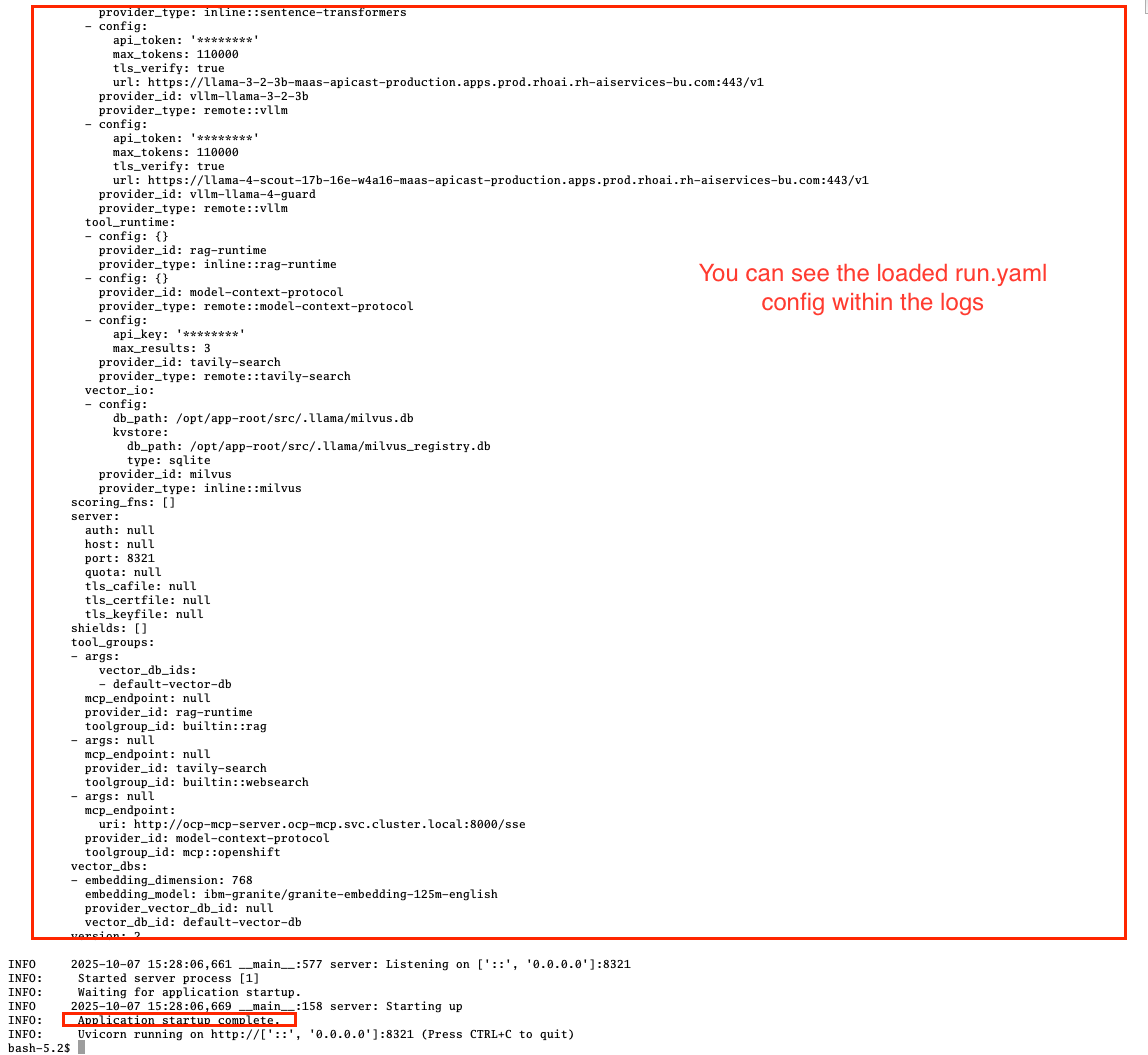
|
Llama stack server is ready to go! |
6. Exploring Llama stack server APIs
By its core llama stack is a set of apis. As the llama stack server comes with a swagger ui, its easy to investigate its apis via the browser.
As the llama stack server is not exposed to the outside of the cluster, lets create a local port forward for the service:
oc port-forward services/llamastack-with-config-service 8321:localhost:8321 -n llama-stackOpen http://localhost:8321/docs# on a browser of your choice.
You should see the following swagger ui:
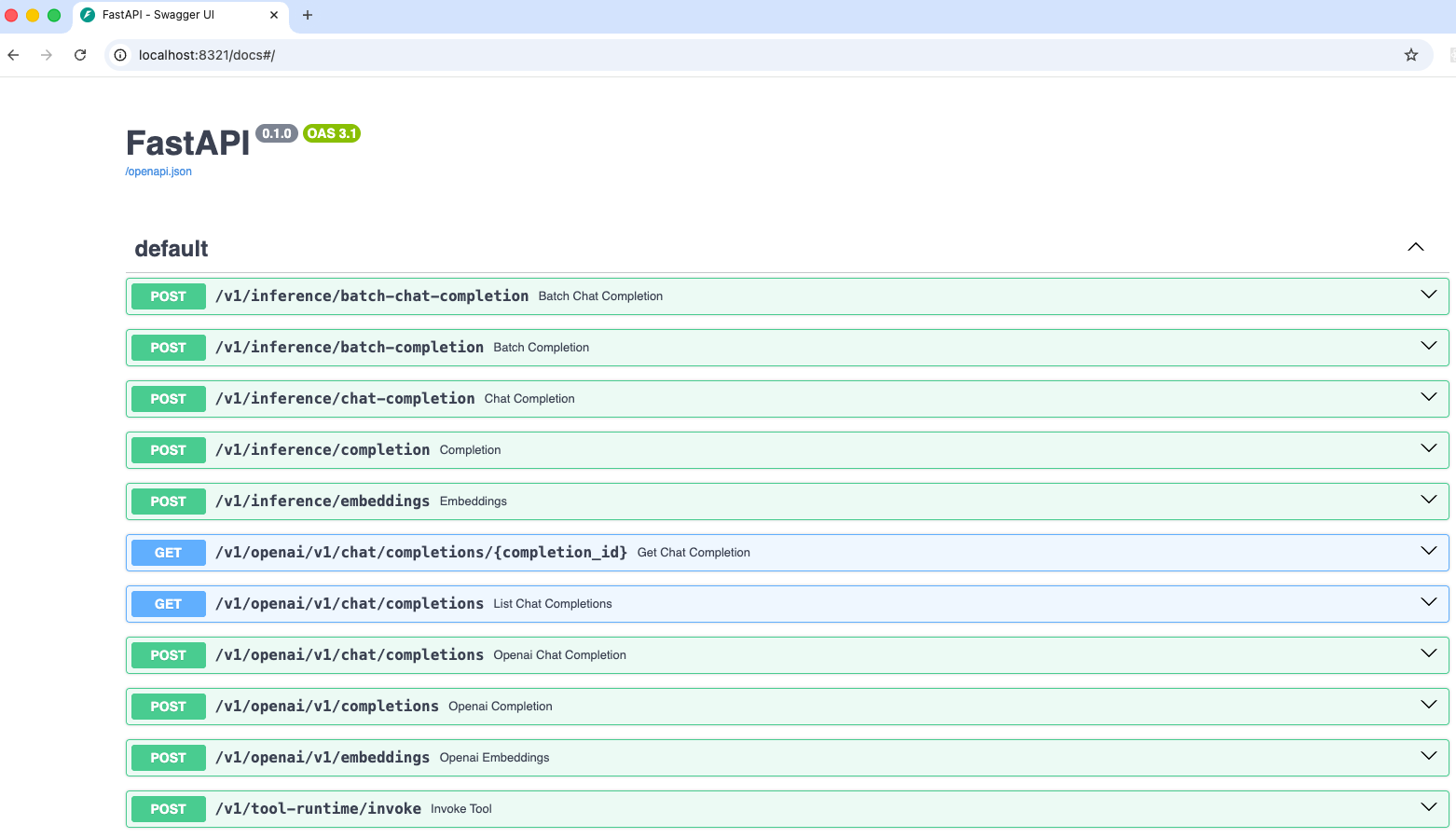
Try to find the following information using the swagger ui:
-
Which models are registered on the server?
-
What tool groups are registered on the server?
-
Which tools are provided by the builtin::websearch tool group?
7. Deploy the OpenShift MCP Server
To finish the lab setup, we are going to deploy an instance of the Openshift MCP server. The OpenShift Model Context Protocol (MCP) server acts as a bridge, allowing the Llama Stack agent to interact with the OpenShift cluster to answer questions about its state.
7.1. Openshift MCP namespace
First, create a new namespace for the MCP server:
apiVersion: v1
kind: Namespace
metadata:
  name: ocp-mcp
Save this file as ocp-mcp-namespace.yaml and apply it using oc apply -f ocp-mcp-namespace.yaml.
7.2. Service account & RoleBinding
Next, create a ServiceAccount and the necessary RoleBinding and ClusterRoleBinding to grant it permissions to read resources from the cluster.
apiVersion: v1
kind: ServiceAccount
metadata:
  name: ocp-mcp
  namespace: ocp-mcp
---
apiVersion: rbac.authorization.k8s.io/v1
kind: ClusterRoleBinding
metadata:
  name: cluster-admin-ocp-mcp
roleRef:
  apiGroup: rbac.authorization.k8s.io
  kind: ClusterRole
  name: cluster-admin
subjects:
- kind: ServiceAccount
  name: ocp-mcp
  namespace: ocp-mcp
Save this file as ocp-mcp-sa.yaml and apply it using oc apply -f ocp-mcp-sa.yaml.
7.3. Deployment
Now, create the Deployment for the MCP server.
apiVersion: apps/v1
kind: Deployment
metadata:
  labels:
    app: ocp-mcp-server
  name: ocp-mcp-server
  namespace: ocp-mcp
spec:
  replicas: 1
  selector:
    matchLabels:
      app: ocp-mcp-server
  template:
    metadata:
      labels:
        app: ocp-mcp-server
        deployment: ocp-mcp-server
    spec:
      containers:
      - name: ocp-mcp-server
        args:
        - --sse-port
        - "8000"
        command:
        - ./kubernetes-mcp-server
        # K8s mcp server image from rh etx
        image: quay.io/eformat/kubernetes-mcp-server:latest
        imagePullPolicy: Always
        ports:
        - containerPort: 8000
          name: http
          protocol: TCP
        resources: {}
      serviceAccountName: ocp-mcp
Save this file as ocp-mcp-deployment.yaml and apply it using oc apply -f ocp-mcp-deployment.yaml.
7.4. Service
Finally, create the Service to expose the MCP server within the cluster.
apiVersion: v1
kind: Service
metadata:
  labels:
    app: ocp-mcp-server
  name: ocp-mcp-server
  namespace: ocp-mcp
spec:
  ports:
  - port: 8000
    protocol: TCP
    targetPort: http
  selector:
    app: ocp-mcp-server
    deployment: ocp-mcp-server
Save this file as ocp-mcp-service.yaml and apply it using oc apply -f ocp-mcp-service.yaml.
8. Out of Scope Llama Stack features
Llama stack offers a rich variety of features. In the upcoming modules of this lab, we will explore several of them — but not all. Some of the features we will not cover in this lab include:
-
Evaluations - Run evaluations on model and agent candidates using evaluation datasets.
-
Shields - Register guardrails that ensure that the model only answers questions within the intended scope of the application (e.g LLM refuses to answer questions on how to break the law in an insurance quote application).
-
Telemetry - Built-in OpenTelemetry (OTEL) export capabilities to monitor and measure the performance, behavior, and health of generative AI applications built with the Llama Stack.
-
Post Training - Fine-tune models using various providers and frameworks.
-
External APIs - Register and integrate your own APIs to extend the functionality of the Llama Stack.